The 2026 ‘Asset-Modular’ Workflow: A Step-by-Step Guide to High-Speed Comic Production
Discover the 2026 industry standard for scaling webtoon production without sacrificing creative soul. This guide breaks down the Asset-Modular system for high-speed, high-quality output.
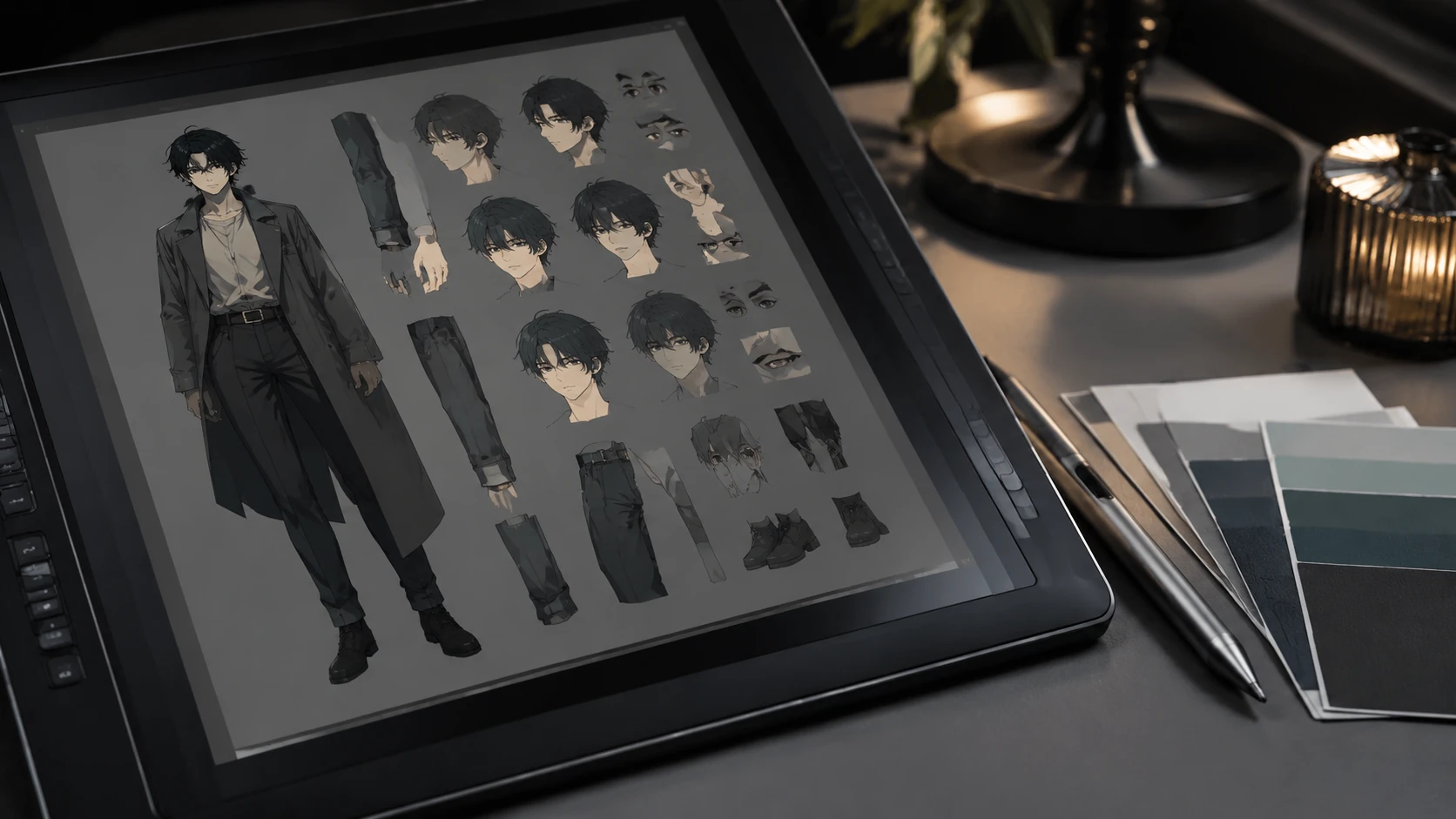
In the 2026 webtoon and digital comic market, the primary bottleneck for independent creators and boutique studios is no longer inspiration—it is the sheer velocity of production. As reader expectations shift toward daily drops and high-fidelity visuals, the traditional 'frame-by-frame' drawing method has become economically unsustainable for most. The 2026 'Asset-Modular' workflow is the industry's response, moving away from destructive drawing techniques toward a library-based assembly system. This method allows creators to maintain 100% hand-drawn quality while reducing the time spent on repetitive tasks by up to 40%. By treating character designs, backgrounds, and lighting setups as reusable, interoperable modules, you can focus your creative energy where it matters most: expressive acting, dynamic cinematography, and narrative pacing. This guide provides a comprehensive framework for transitioning from a linear drawing process to a scalable production engine.
The Philosophy of Modular Storytelling
The Asset-Modular workflow is not about cutting corners or using generic AI-generated filler; it is about building a bespoke, high-quality 'kit' of your own intellectual property. In 2026, top-performing creators treat their series like a video game engine. Every recurring character is 'rigged' with a set of pre-built hands, facial expressions, and clothing folds that are optimized for the vertical scroll. This approach ensures visual consistency across hundreds of chapters, a key metric for building E-E-A-T (Experience, Expertise, Authoritativeness, and Trustworthiness) with your audience. When your protagonist looks identical in chapter 1 and chapter 100, reader immersion remains unbroken. Moreover, this system prepares your IP for the 2026 'Narrative Liquidity' standard, making it significantly easier to export your assets for spin-offs, merchandise, or multi-platform adaptations without redrawing the entire universe from scratch.
Phase 1: Engineering the Multi-Surface Character Rig
Traditional character sheets are static; 2026 modular rigs are functional. The first step in this workflow is creating a 'Master Asset File' for every primary character. Unlike a simple reference sheet, this file contains categorized layers of pre-drawn components. For high-speed production, you must shift toward a hybrid vector-raster approach. Use vector layers for line work—allowing for infinite scaling without pixelation—and raster layers for painterly textures and lighting effects. By creating a library of at least 15 'Essential Expressions' and 10 'Common Hand Gestures' per character, you can eliminate the 'blank canvas' anxiety that slows down production during the sketching phase. These assets are not meant to be static stamps; they serve as a 'deformable' base that the artist tweaks to fit the specific emotional weight of a panel.
- Head Rotation Kit: 5-angle perspective base (front, 3/4, profile, 3/4 back, back).
- Expression Toggles: Modular eyes, mouths, and eyebrows that can be mixed and matched.
- Dynamic Line-Weight Profiles: Standardized brush settings to ensure consistent line thickness across assets.
- Clothing Physics Modules: Pre-calculated fold patterns for common movements like walking or sitting.
Phase 2: Environment Instancing and Lighting Maps
Backgrounds are often the most time-consuming part of webtoon production. The 2026 standard utilizes 'Environment Instancing,' where 3D layouts are converted into 'Smart 2D Overlays.' Instead of redrawing the protagonist’s bedroom for every scene, creators use a high-fidelity 3D base to lock in the perspective and camera angle. The modular part comes in the 'Lighting Pass.' By creating 'Mood Maps'—pre-set color and light layers for different times of day (Golden Hour, Midnight, Overcast)—you can drag and drop an entire atmospheric setting onto your 3D-guided sketch. This ensures that the environment feels lived-in and responsive to the story's emotional beats. The goal is to spend 90% of your background time on the first 10 panels to 'set the stage,' then use the modular library to maintain that quality for the rest of the arc.
Phase 3: The Assembly and 'Neural Cleanup' Stage
Assembly is where the modular pieces come together. In 2026, the 'rough sketch' phase is increasingly replaced by 'Asset Blocking.' The creator places the pre-built rigs into the panels to establish composition and eye-line before committing to final inks. This allows for rapid iteration of the narrative pacing without the 'sunk cost fallacy' of a fully rendered drawing. Once the composition is locked, the 'Neural Cleanup' stage begins. This involves using specialized AI tools—trained only on your own hand-drawn assets—to automate the tedious flat-coloring and shadow-filling processes. This 'Human-in-the-loop' automation is crucial for maintaining the 'Helpful Content' status, as the creative direction and initial asset creation remain entirely under the artist's control, while the machine handles the repetitive labor.
The 2026 Workflow Checklist for Creators
Transitioning to a modular system requires an initial time investment, but the long-term ROI is undeniable. Before starting your next major series or arc, ensure you have audited your production pipeline against this 2026 efficiency standard. A well-organized asset library is the difference between a creator who burns out after 20 chapters and a creator who builds a 200-chapter IP powerhouse. Focus on building a system that serves your story, rather than being a slave to the individual panel. Use the following checklist to benchmark your current workflow readiness.
- Is your asset naming convention standardized for easy search and retrieval?
- Do you have a 'Global Color Script' that defines palettes for every recurring location?
- Are your character components organized by 'Anatomy,' 'Clothing,' and 'Expression' layers?
- Have you tested your 3D-to-2D background pipeline for perspective consistency?
- Is your file structure optimized for collaborative cloud sync (if working with a team)?
FAQ
Does a modular workflow make the art look stiff?
Only if used incorrectly. The key is to treat assets as 'deformable bases' that you manually tweak for acting and emotion, rather than static stamps.
What software is best for asset-modular comic production in 2026?
Clip Studio Paint and specialized webtoon engines with robust 'Asset Library' and 'Vector-Layer' support are currently the industry leaders.
How long does it take to set up a modular library?
Typically, the setup takes 2-3 weeks of dedicated 'Pre-Production,' which is usually recouped within the first 5 chapters of production.